Zubi Canvas: you build the workbook
When a learning support teacher says “I want it editable”, they almost never mean rewriting text: they mean taking one exercise out, putting another in and changing the order. That is Zubi Canvas. And it shows something you could not see until now: whether the workbook you are building is balanced or has drifted to one side.
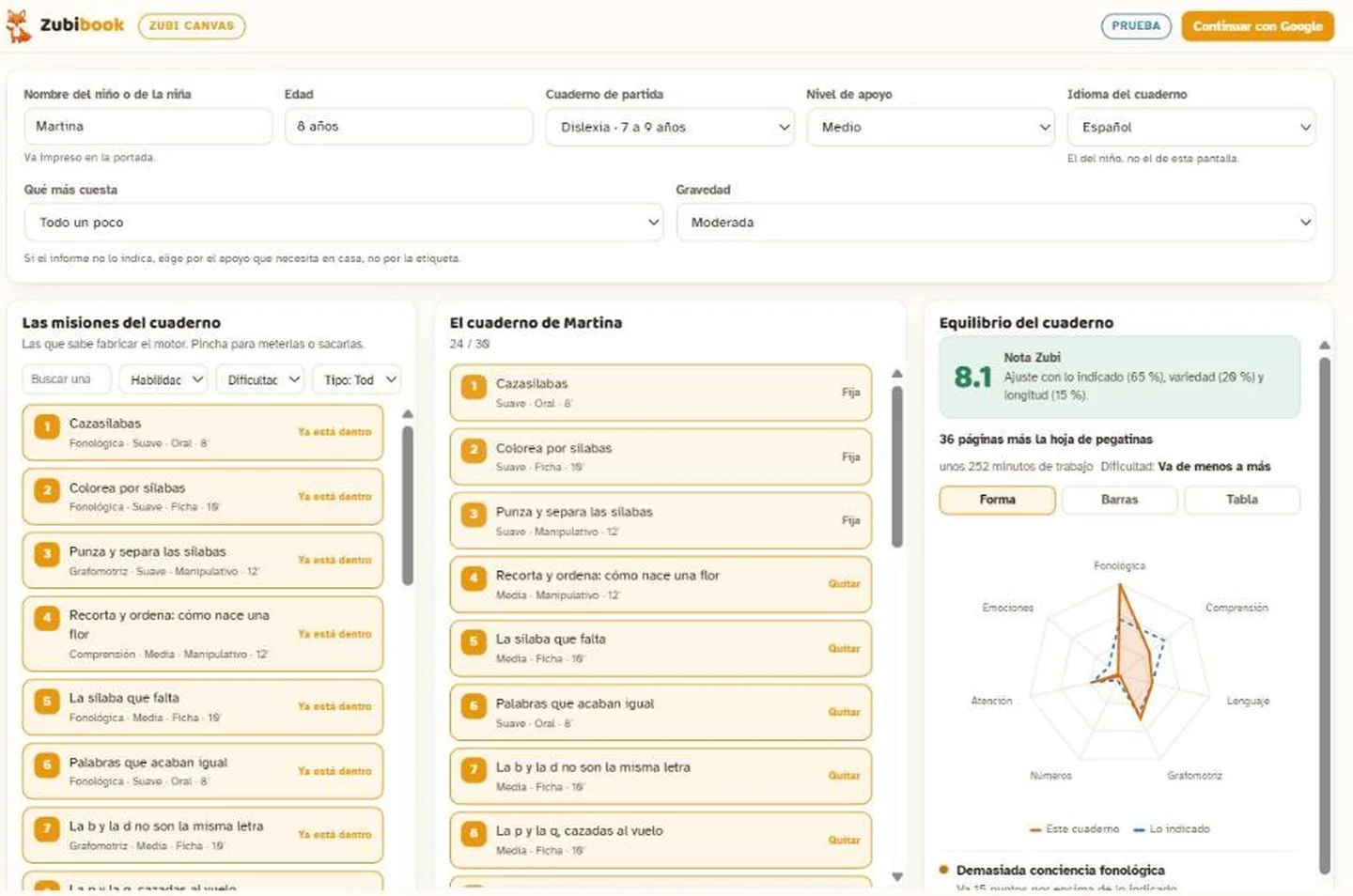
Three columns, that’s all
On the left, the missions
The ones the engine really knows how to build for that workbook, with what each trains, its difficulty, whether it is a worksheet, hands-on, spoken or movement, and the minutes it takes. Filter by skill, difficulty and type.
In the middle, the workbook
The missions you have put in, in order, with the child’s name at the top. Click to take out and to put in. Some are marked fixed: another page of the workbook names them, or they close it, and removing them would leave a reference pointing nowhere.
On the right, the balance
The Zubi score, the heptagon with your workbook in orange and what is indicated in blue, and concrete warnings: “short on comprehension, 9 points below”. Three views of the same data: shape, bars and table.
The Zubi score
A teacher preparing material by hand has no way of knowing whether this week they reinforced attention three times and comprehension not once. The heptagon says it in two seconds. There are seven skills — phonological awareness, comprehension, language, handwriting, numbers, attention and emotions — and each mission splits a hundred points between several of them, by what the child actually does, not by the title.
The score combines three things: how close your split is to the indicated one (65 %), how many skills are present (20 %) and the length of the workbook (15 %).
It is advice, not a barrier. The request button works whatever the score. You are the one who knows the child: if you decide to hammer comprehension this month because that is what is needed, Canvas says so and steps aside.
No official body publishes a split in percentages. None. That is why the blue shape is not sold as a standard: it is a Zubibook recommendation built on the available evidence, and you can depart from it whenever you like.
What the report says
When you choose the workbook, the dimensions the child’s report carries appear: the level of support in autism, the presentation and severity in ADHD, the reading specifier in dyslexia, and their equivalent in dyscalculia, dysgraphia, language and emotions.
They are not decoration: they move the blue shape, bound how many demanding missions are advisable and change what Canvas proposes. An inattentive ADHD and a hyperactive-impulsive one do not get the same recommendation.
If the report does not say — in autism that happens in six out of ten — choose by the support the child needs at home, not by the label. Canvas says so on screen.
It prints exactly as you build it
What Canvas produces is not a suggestion: it is the exact spec our engine consumes. The same one that builds the catalogue workbooks. You pick the workbook language — all seven — and the level of support, and out comes the PDF with the child’s name on the cover and its sticker sheet.
Canvas tells you in advance how many pages it will have and how many minutes of work it is. After you request it, it reaches your inbox within 48 working hours.
Which plan
Canvas comes with the professional plans. Each seat is three workbooks a month for that pupil.
All three carry the complete catalogue with the three levels of support, a printing licence for the practice or the classroom and a single invoice a month. Cancel in one click.
Canvas lives inside your panel
Canvas is not a separate screen: it lives inside the professional panel and opens on its own, with your plan account. You sign in once and it is already there, with your monthly allowance and the button to order the workbook.
Questions before deciding? Write to info@zubibook.com and we answer ourselves.